
EZ File Searcher
Find every file that contains a word or phrase — Word, Excel, PowerPoint, PDF, logs and configs — offline on your own Windows PC. Free.
- v1.0.0
- Windows 10/11
- Updated 15 Oct 2026
Download
Download Installer (.exe) 17.0 MB- Portable (zip) 21.7 MB Unzip anywhere and run — nothing to install.
Is it safe? Check it yourself
- VirusTotal checks a file with 70+ antivirus engines at once, free.
-
Make sure your file is the one we published. Its SHA-256 fingerprint must match:
- EZ-File-Searcher-Setup-1.0.0.exe
4a8a5c76ae281707b28571a1911fc2034634e8934fd60009ebf278de67eba4ea - EZ-File-Searcher-1.0.0-portable.zip
a445534e65d6d4e73ddcb24ac0f3ca221b9ba50db931f1434146b95600e04720
On Windows, open PowerShell in your Downloads folder and run:
Get-FileHash .\EZ-File-Searcher-Setup-1.0.0.exe -
- The program is not code-signed yet, so Windows SmartScreen may say "Windows protected your PC". Click More info → Run anyway. That warning is about the missing signature, not a virus.
EZ File Searcher
Find every file that contains a word or phrase — inside Word, Excel, PowerPoint, PDF, text, log and config files. Offline, on your own PC. No account. Free.
Cari fail yang ada perkataan tertentu di dalamnya — Word, Excel, PowerPoint, PDF, log dan config — terus dalam PC anda. Takde upload, takde account, percuma.
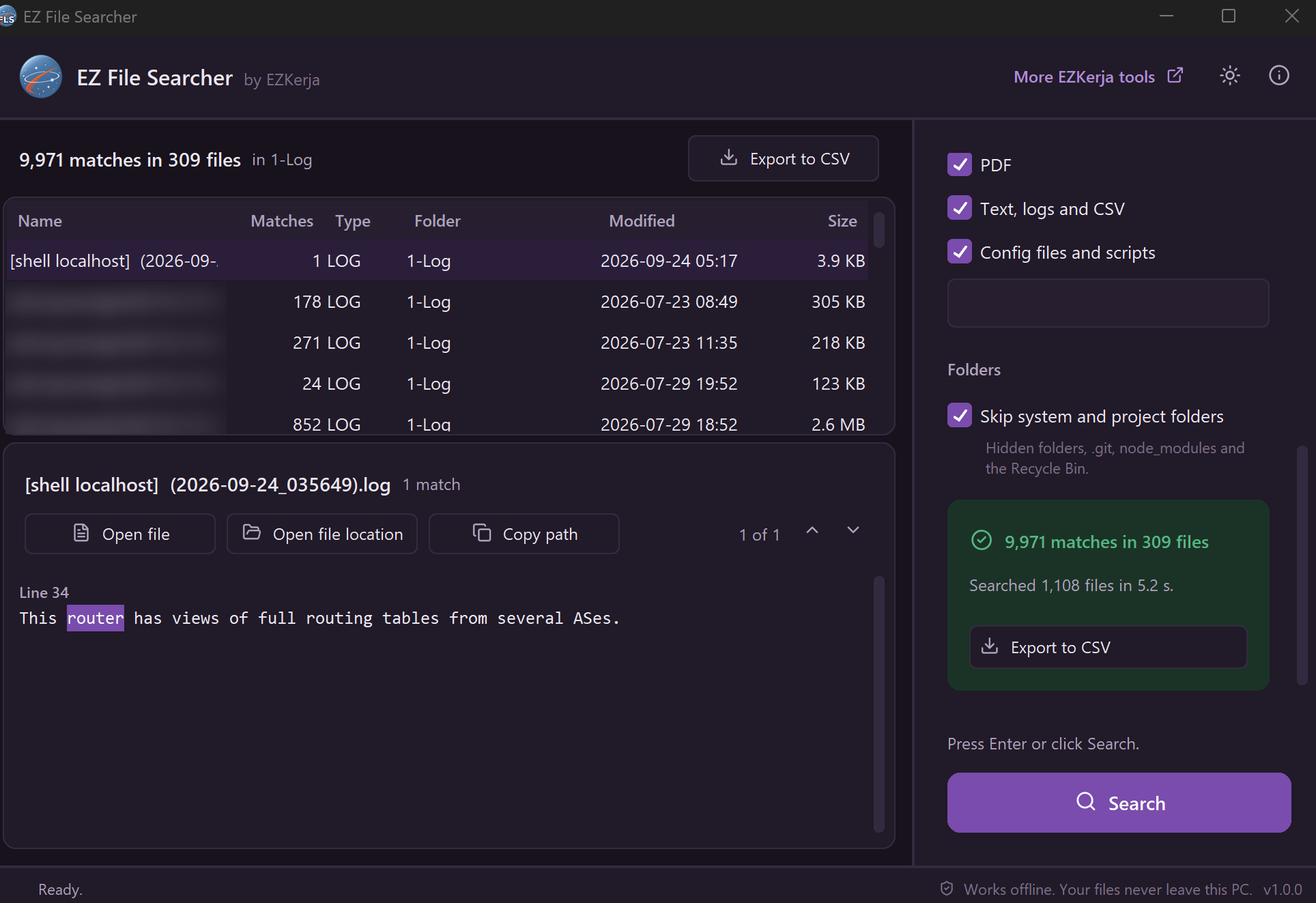
1,108 log files searched in 5.2 seconds. Click a file to see every match, with the exact line highlighted.
Why this exists
You know the document exists. You remember one line from it — a hostname, a serial number, a customer name, an IP address. You don’t remember the file name, and you don’t remember which of the 400 files in that project folder it was in.
Windows search looks at file names, and often at nothing inside a PDF or an Excel sheet. So you end up opening files one by one.
EZ File Searcher opens every file in the folder for you, reads what is inside, and shows you exactly where the text is: the line in a config, the page in a PDF, the cell in Excel, the slide in PowerPoint.
What it does
| Searches inside files | Word (including tables, text boxes, headers and footers), Excel (every sheet), PowerPoint (including speaker notes), PDF, text, logs, CSV, config files and scripts. |
| Tells you where | Line 42 in a config, Page 7 in a PDF, 'Stock list'!B12 in Excel, Slide 3 notes in PowerPoint — with the matching words highlighted. |
| Open file location | One click opens File Explorer with the file already selected. Or open the file, or copy its path. |
| Search options | Match case, whole word only, regular expressions, and matching file names too. Add your own extensions such as .rsc or .tmpl. |
| Export to CSV | Every match as a row — file, folder, location and the matching text. Opens straight in Excel for your report. |
| Honest about what it skipped | Password-protected, damaged and scanned files are listed with the reason, instead of quietly missing from the results. |
What it promises
- 100% offline — no upload, no account, no tracking
- Read-only — it never changes, moves or deletes your files
- Scripts are never run — opening a
.bat,.ps1or.regresult shows it in Notepad - OneDrive “online-only” files are not downloaded behind your back — they are listed as skipped
- Stays responsive on big folders, with a Stop button
- No admin rights needed — for the installer or the portable zip
- Dark mode and keyboard shortcuts (Ctrl+F, Enter, F3 for the next match, Esc to stop)
Download and run
Two ways to get it. Same program, pick one.
Installer — recommended
- Click Download Installer (.exe) above.
- Double-click
EZ-File-Searcher-Setup-1.0.0.exe. - Click Next through the steps. It installs into your own user folder, so no admin rights are needed.
- Open EZ File Searcher from the Start menu.
Portable (zip) — nothing to install
- Click Portable (zip) above.
- Right-click the zip → Extract All.
- Open the folder and double-click
EZ File Searcher.exe.
Keep the _internal folder next to the .exe — the program needs it.
Windows protected your PC? The program is not code-signed yet, so Windows SmartScreen may warn you the first time. Click More info → Run anyway. The download box above shows how to check the file with VirusTotal and its SHA-256 fingerprint.
About the VirusTotal result
Two engines on VirusTotal flag the installer: Arctic Wolf (“Unsafe”) and DeepInstinct (“Malicious”). Every other engine reports no threat. These are false positives. Both engines use machine learning to guess from how a file is built, not from known malware. Programs made with PyInstaller (a common tool for packaging Python apps) that are not code-signed yet, like this one, often get flagged this way. EZ File Searcher only reads files on your PC. It never changes them and never sends anything over the internet. If you want to be sure, check the SHA-256 fingerprint in the download box above against the VirusTotal report.
How to use it
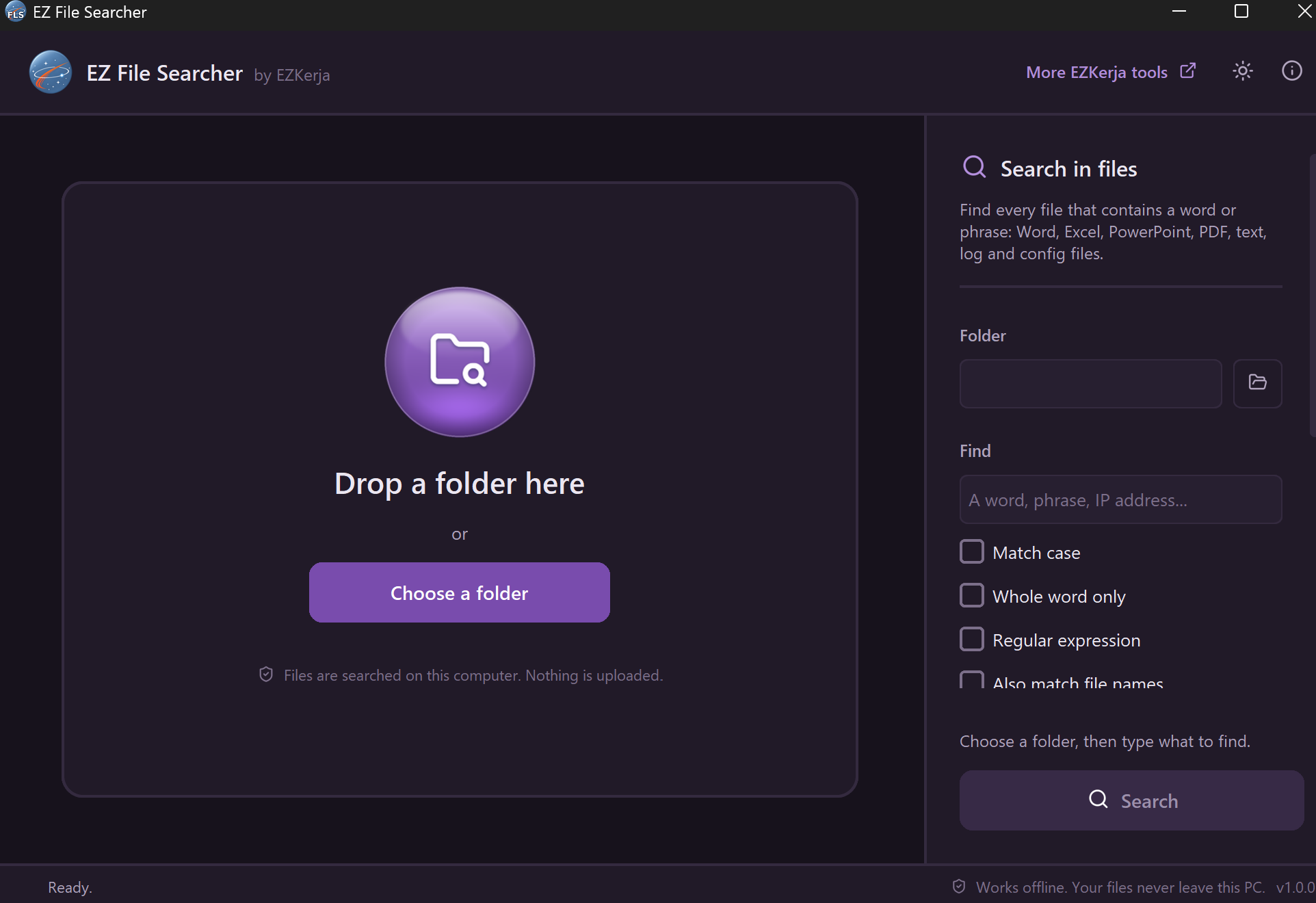
- Drag a folder into the window, or click Choose a folder.
- Type what you are looking for — a word, a phrase, an IP address, a serial number.
- Press Enter.
- Click a file in the list to see every match in it. Use the arrows (or F3) to jump between them.
- Click Open file location to go straight to it in File Explorer, or Export to CSV to keep the list.
Requirements
- Windows 10 or Windows 11 (64-bit)
- No admin rights, no internet connection
Honest limits
- Windows only. No Mac or Linux version.
- Old Office formats are not read —
.doc,.xlsand.ppt(Office 97–2003). Neither is Outlook.msg. Save them as.docx/.xlsx/.pptxfirst. - Scanned PDFs have no text to search. The app lists them as “scanned PDF” instead of pretending they had no match. It does not do OCR.
- Password-protected files can’t be searched — they are listed, not opened.
- Excel dates show as numbers in the results (for example
45560), the way Excel stores them. - It searches as it goes; it doesn’t keep an index. A search of a very large drive takes as long as reading those files does. Everything Search and similar indexers are faster for file names; this tool is for what is inside the files.
- Not code-signed yet, so expect the SmartScreen warning above.
Cara guna (BM)
Installer (disyorkan):
- Klik Download Installer (.exe) di atas.
- Double-click
EZ-File-Searcher-Setup-1.0.0.exe, klik Next sampai siap. Tak perlu admin rights. - Buka EZ File Searcher dari Start menu.
Portable (zip): klik kanan fail zip → Extract All, kemudian double-click
EZ File Searcher.exe.
Lepas tu, drag folder masuk ke dalam app (atau klik Choose a folder), taip perkataan yang anda cari, dan tekan Enter. Klik fail dalam senarai untuk tengok setiap tempat perkataan itu dijumpai. Klik Open file location untuk terus buka folder fail tersebut.
Pasal keputusan VirusTotal: dua engine (Arctic Wolf dan DeepInstinct) menandakan installer ini sebagai berisiko, engine lain semua bersih. Itu false positive: kedua-dua engine guna machine learning untuk meneka berdasarkan cara fail dibina, bukan malware yang dikenal pasti. App Python yang dibungkus dengan PyInstaller dan belum code-signed memang kerap disalah tanda begini. Anda boleh semak SHA-256 fail dengan laporan VirusTotal di kotak download.
Semua carian berlaku dalam PC anda. App ini hanya membaca fail — ia tidak pernah mengubah, memindah atau memadam apa-apa.
License
Free to use. MIT licence. Third-party component licences are in the licenses folder inside the
app.
Questions
Ask on WhatsApp — the button is below. Malay or English, both fine.